在 ESXi 中匯入 OVA / OVF 範本只能透過上傳本機檔案,無法從 ESXi 上的 datastore 匯入,因此需透過 ovftool 來完成這件事情。但執行時碰到了 vim.fault.FileNotFound。
 1
 2
 3
 4
 5
 6
 7
 8
 9
10
11
12
13
14
15
16
17
18
19
20
| calos@ASUS-ESC500G3:~ ovftool \
--net:LAN_172.16.1.X=VM\ Network \
--net:LAN2_172.16.2.X=VM\ Network \
--net:LAN3_172.16.3.X=VM\ Network \
--net:DMZ_172.16.60.X=VM\ Network \
https://172.16.1.10/folder/templates/template_bastion-host.ovf\?dcPath\=ha%252ddatacenter\&dsName\=datastore1 \
vi://172.16.1.10
Enter login information for source https://172.16.1.10/folder/templates/
Username: calos
Password: ***************
Opening OVF source: https://172.16.1.10/folder/templates/template_bastion-host.ovf
The manifest validates
Enter login information for target vi://172.16.1.10/
Username: calos
Password: ***************
Opening VI target: vi://calos@172.16.1.10:443/
Error:
- A general system error occurred: Fault cause: vim.fault.FileNotFound
Completed with errors
|
查了一下原因,發現是 OVF 本身的 CD/DVD 還掛著 ISO,導致失敗。參考了這篇使用 --noImageFiles,但依然沒有成功。
最後嘗試直接編輯 OVF 檔,把 CD/DVD 裝置直接刪掉:
 1
 2
 3
 4
 5
 6
 7
 8
 9
10
| <!-- 下關鍵字找 DVD,找到這節把它刪掉 -->
<Item ovf:required="false">
<rasd:AddressOnParent>0</rasd:AddressOnParent>
<rasd:AutomaticAllocation>false</rasd:AutomaticAllocation>
<rasd:ElementName>CD/DVD drive 1</rasd:ElementName>
<rasd:InstanceID>8</rasd:InstanceID>
<rasd:Parent>4</rasd:Parent>
<rasd:ResourceSubType>vmware.cdrom.iso</rasd:ResourceSubType>
<rasd:ResourceType>15</rasd:ResourceType>
</Item>
|
再次執行,還是失敗了。
1
2
3
4
| Opening OVF source: https://172.16.1.10/folder/templates/template_bastion-host.ovf
The manifest validates
Error: SHA digest of file template_bastion-host.ovf does not match manifest
Completed with errors
|
這邊是因為當初將 OVF 匯出時,會同時倒出一個 .mf 檔案,裡面記錄了 VMDK 與 OVF 檔的 hash,可用來檢測是否被更改過。
1
2
| SHA1(template_bastion-host-disk1.vmdk)= 6f9c36327d0b00e4d52d93484c54fa625d4a48f2
SHA1(template_bastion-host.ovf)= 71aafebf0a44f2b59f00af0c71a7ef26ff7869e5
|
這邊有兩個處理方式:
- 重新對 OVF 檔產生一個相應的 hash,換掉原本的 hash sum,然後把更改過的 MF 檔覆蓋上去
- 直接砍掉 MF 檔
這裡使用第一種方法,因為 MF 檔裡面使用的是 SHA1,因此這邊使用 sha1sum 產生 OVF 檔的 hash sum,然後蓋掉原本的 hash sum
1
2
| calos@ASUS-ESC500G3:~ $ sha1sum template_bastion-host.ovf
aacf02cdea9311e0e2dd96d37eb41cf217705541 template_bastion-host.ovf
|
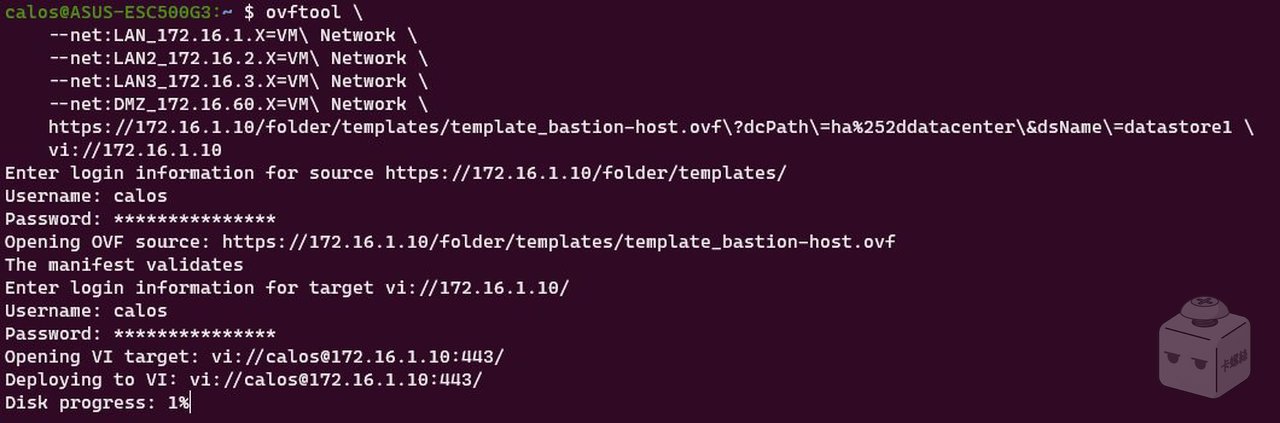
再次執行 ovftool,終於成功了!
References